
On this page
Before you start
Step 1 of 6
Find members the club cannot email
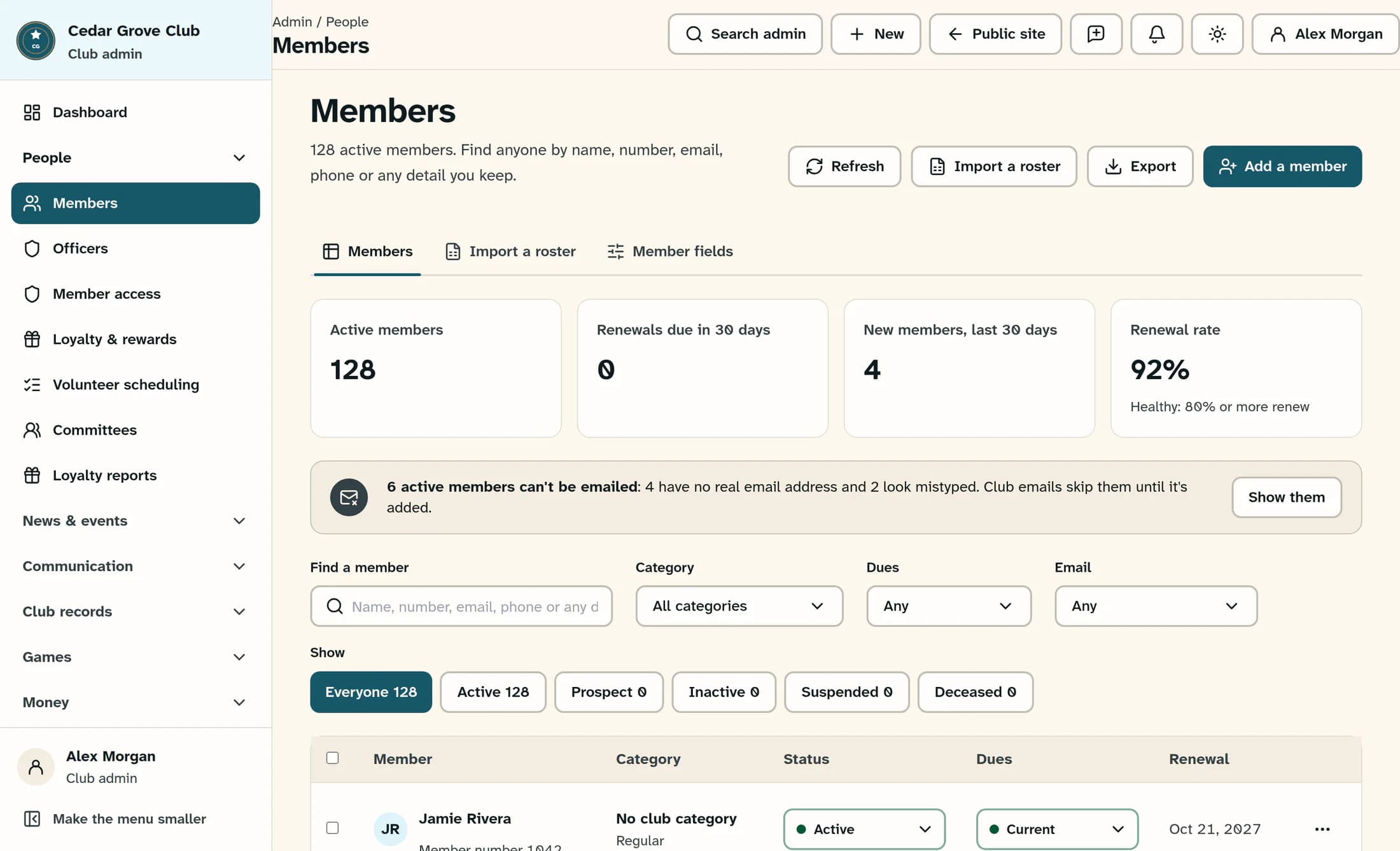
Open People > Members. The banner for active members who can't be emailed counts active members with no real address or an address that looks mistyped. Select Show them to set the status to Active and the Email filter to Can't be emailed.
You can also use Email to choose Any, Can't be emailed or Looks mistyped. The manual filter works with the selected status and every other filter. Show them leaves your search, category and dues filters in place, so clear the search and choose All categories and Any dues if someone is missing.
Match the name and member number, then select the member’s name. For more help, see Find members with search and filters.
Step 2 of 6
Check the saved record and sign-in
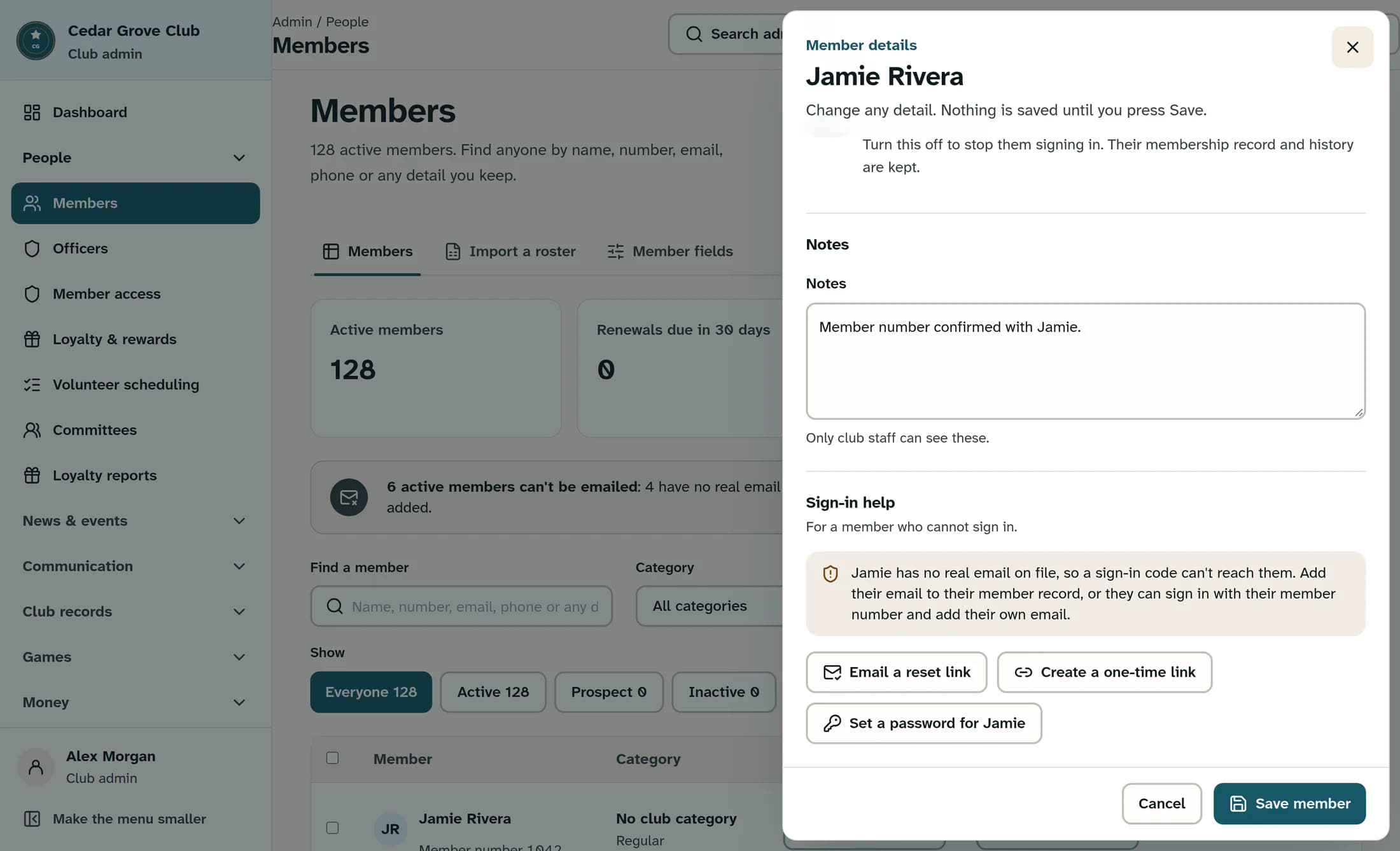
In the member’s details, review Email under Name and contact, then scroll down to Sign-in help. This section checks the saved record, not an email you have typed but not saved.
A missing address, an imported roster stand-in such as
roster+1042@members.clubworks.local, a reserved example address or a recognized mistyped domain cannot receive club email. Looks mistyped is a clue: ask the member to confirm the address instead of guessing a correction that could reach someone else. An address that is not flagged is not proof that its inbox works.No usable email does not mean the membership is inactive or that there is no existing login. Read the sign-in message before choosing one of the routes below.
Step 3 of 6
If the member has an inbox, save their confirmed address
Ask the member to confirm an address they personally use. In Name and contact, replace Email with that address. Review the rest of the form, then select Save member. This saves the whole form, including required fields; a blank Email cannot be saved. Leave unrelated membership details unchanged.
Read the full result. A save can be partial, so do not assume every part succeeded. Reopen the member, check the saved Email, and review Sign-in help again. An old linked sign-in address may remain after the contact email changes. If the addresses do not match, follow Correct a member’s sign-in email or account link.
In the illustration,
jamie.rivera@example.comhides the member’s real address for privacy. It is a display redaction, not an address to enter:example.comcannot receive club email. Use the member’s confirmed, usable inbox.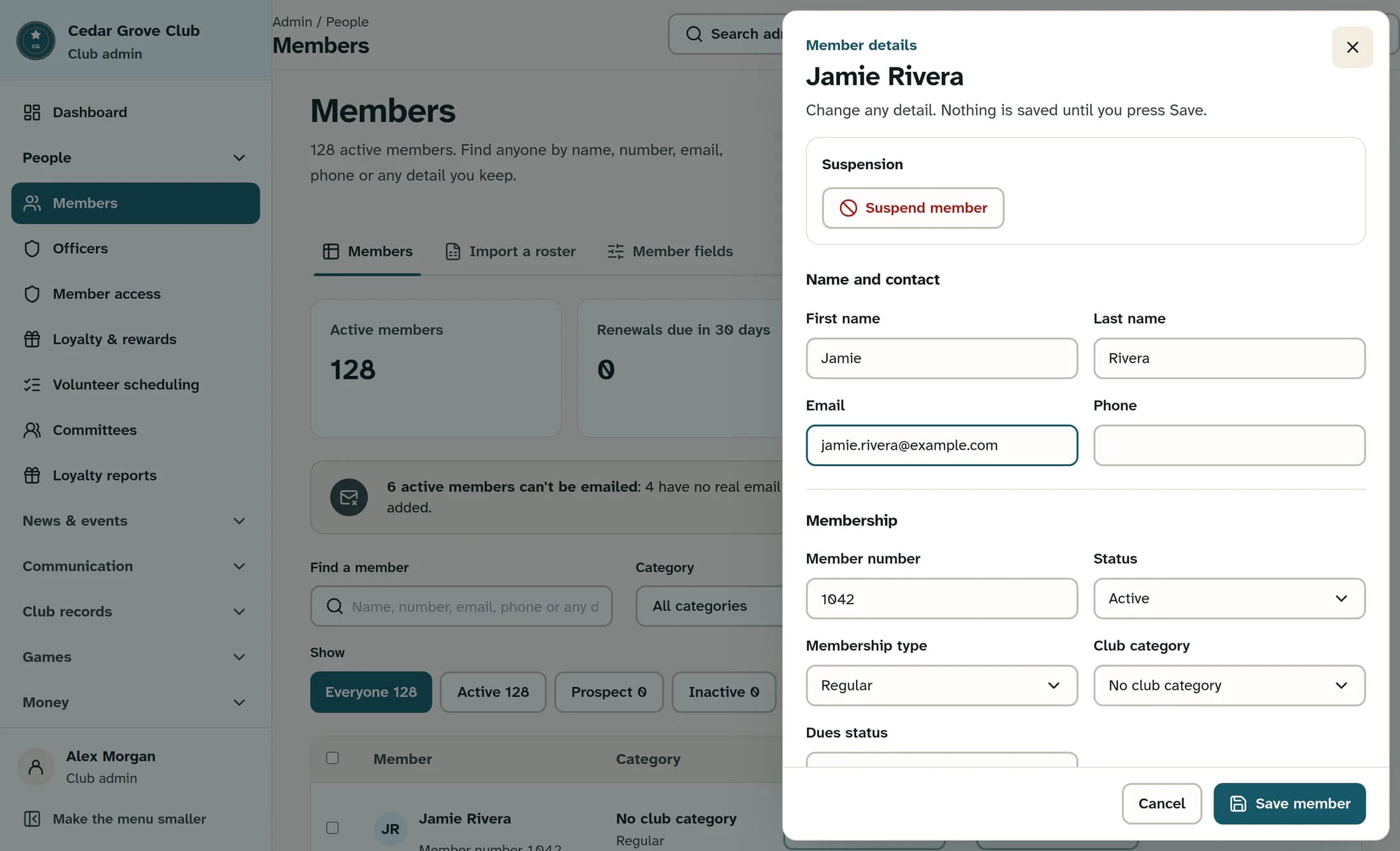
Step 4 of 6
If the member wants to add their own address
The member can open the club’s public member sign-in and choose Use your member number. After an unrecognized email, the option is Find me by member number. They need their exact member number and matching last name, an active membership and an active member profile.
The route for adding an address is available only when the saved record has no usable email and no existing linked login. The member supplies their own real inbox and confirms the emailed code on the same form. ClubWorks links the record, records the change and attempts to notify the club office.
An existing real address produces a masked email hint. An already linked record cannot be reassigned this way. This connects an existing membership; it does not create a new one. Share Claim your membership with a member number for the full steps.
Step 5 of 6
If the member cannot use email at all
Without a usable inbox, the member cannot receive email sign-in codes, password reset mail or app invitations. These are separate workflows, and none makes an unreachable address work.
An authorized club administrator can consider Set a password for a member who cannot receive email for an eligible record. Existing linked accounts and protected profiles still have safeguards. If the saved address is blank, refer the record to the responsible administrator for review.
Do not invent an address, use a shared or administrator inbox, create an arbitrary placeholder, or detach an account to bypass restrictions.
Step 6 of 6
Confirm the result with the member
If an address was added, confirm that the saved record shows it and that Sign-in help matches the intended login, or have the member confirm they can access their account. Disappearing from Can't be emailed alone does not prove that mail arrives.
Keep the member’s communication preferences intact. An email opt-out is separate from whether the address is usable. Previously skipped app invitations do not necessarily resend after an address correction; the invitation queue remembers addresses already stored.
The illustrations use fictional names and reserved addresses to protect privacy. Reserved addresses cannot receive mail. These screens were reconstructed from the application source; live-screen verification is pending.
What to confirm
The member stays on the correct membership record, with either their confirmed email and intended sign-in or an appropriate administrator-assisted route. No usable email is a contact issue to investigate, not a reason to change membership status.
