
On this page
- Visible edits are not a save receipt
- An earlier success can remain beside a new edit
- Autosave still has a waiting period
- An error is not a confirmed save
- A saved draft can still be unpublished
- Publication and playback are separate states
- An unconfirmed save leaves uncertainty
- An open draft is not a recovery guarantee
- Summary
This guide uses the Clubhouse versions of Club profile and the ScreenWorks editor as examples. These management screens require the appropriate permissions, and your layout may vary.
Visible edits are not a save receipt
In Club profile, Unsaved profile changes means the form differs from the version it last recognized as saved. Save profile is the explicit save control, but it can also appear when there are no unsaved changes. A new value visible in a form or preview does not, by itself, show that the server accepted it or that someone else can see it.
An earlier success can remain beside a new edit
Club profile saved. appears after a valid save response. That message can remain after another edit, alongside Unsaved profile changes; it confirms the earlier save, not the newer changes. The current unsaved status matters more than an older success message, and a missing warning is not a universal save receipt.
Autosave still has a waiting period
In the Clubhouse ScreenWorks editor, Editing… means the tracked design or name has a pending change, Saving… means a save request is in progress, and Saved means neither has a pending change in the editor's tracking. Finished document edits autosave after a short pause; the design name saves when focus leaves its field, including when Enter ends name editing. This does not promise an instant save for every keystroke or autosave on every ClubWorks form.
An error is not a confirmed save
ScreenWorks can show Not saved. Check your connection and retry. with Retry save; this is a failed save status, but the wording does not prove the internet connection is the cause. A missing design name or another validation problem can also produce it, so a validation message explains a problem with the entered values, not a success acknowledgment.
A saved draft can still be unpublished
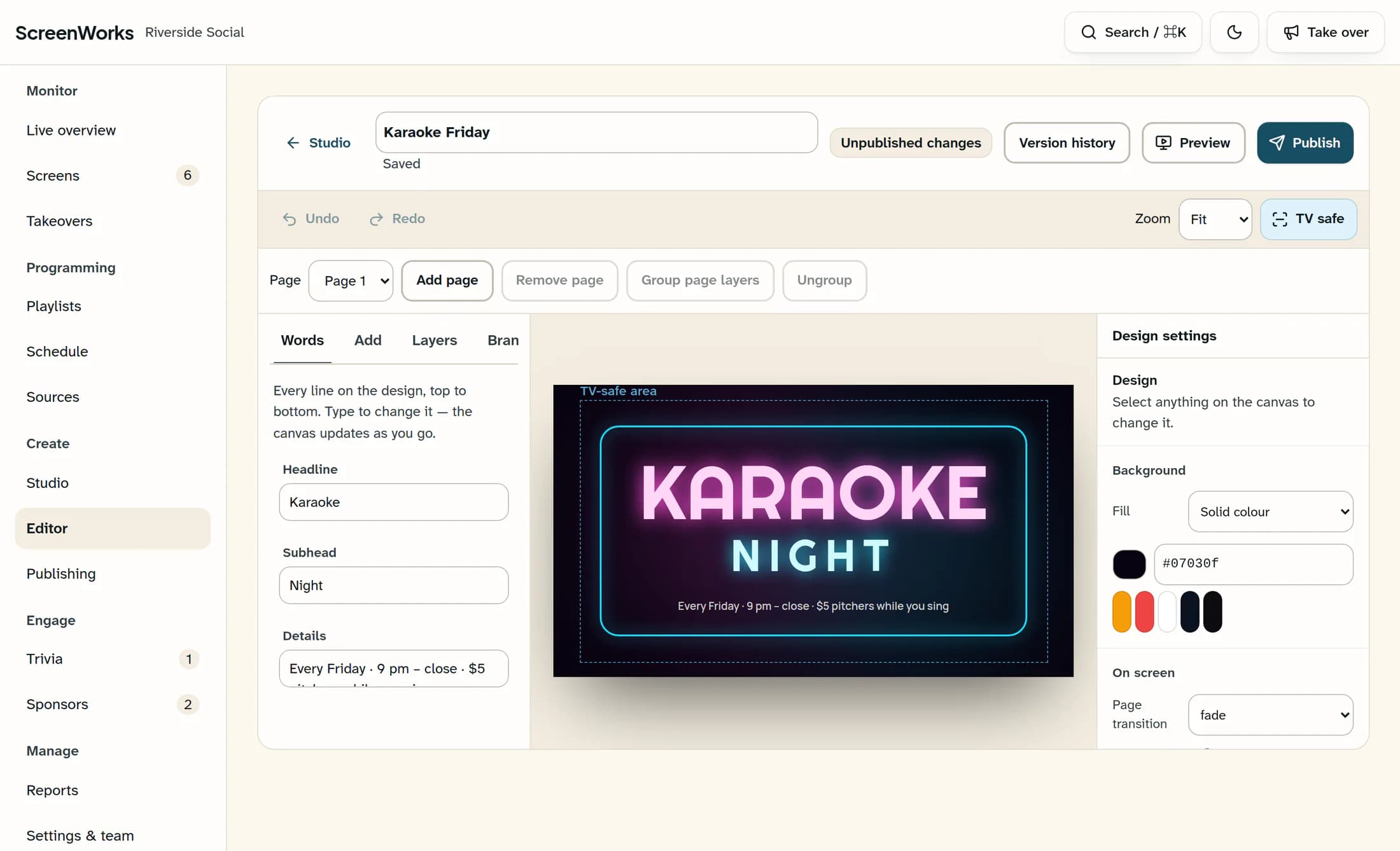
In ScreenWorks, Saved can appear beside Draft or Unpublished changes. Draft means there is no ready published version, while Unpublished changes means the current document differs from a ready published version. The reconstructed illustration uses fictional data to show a saved current draft alongside an older published document: saving the draft does not replace that published version.
Publication and playback are separate states
In ScreenWorks, Drawing… describes rendering progress, and a Published badge with a version number describes a ready published document that matches the current document. Neither Saved nor a published badge proves that a particular TV is playing that version. Club profile works differently: its save updates the shared club record directly, with no separate publication stage.
An unconfirmed save leaves uncertainty
A Club profile response can be missing or unusable even after the server has changed the record, so an unconfirmed save is not proof that nothing was stored. The message “The profile save could not be confirmed. Your draft is kept; review the saved details before retrying.” reflects that uncertainty. It is not a success receipt for the latest edit.
An open draft is not a recovery guarantee
Club profile keeps the open form after validation, session, request, or response failures. “Your draft is kept” describes that open form; it does not promise recovery after closing the page, signing out, or switching devices. The departure warnings in these examples depend on the screen and browser, so their presence or absence cannot guarantee that work will be preserved.
Summary
Save status answers whether the latest tracked changes are acknowledged. Draft and publication status answer which version is ready for viewers; a screen's playback is a further question.
