
On this page
- Before you begin
- What the four club choices mean
- Email and text messages are separate permissions
- Unsubscribing affects a channel
- Push needs more than the main switch
- Categories narrow the push alerts you want
- The available push categories
- App announcements and phone alerts are different
- Your preferences do not decide the audience
- Account and service emails have their own purpose
- What a saved choice tells you
- If the result seems wrong
- What to expect
- Related guides
- About the illustration
Before you begin
What the four club choices mean
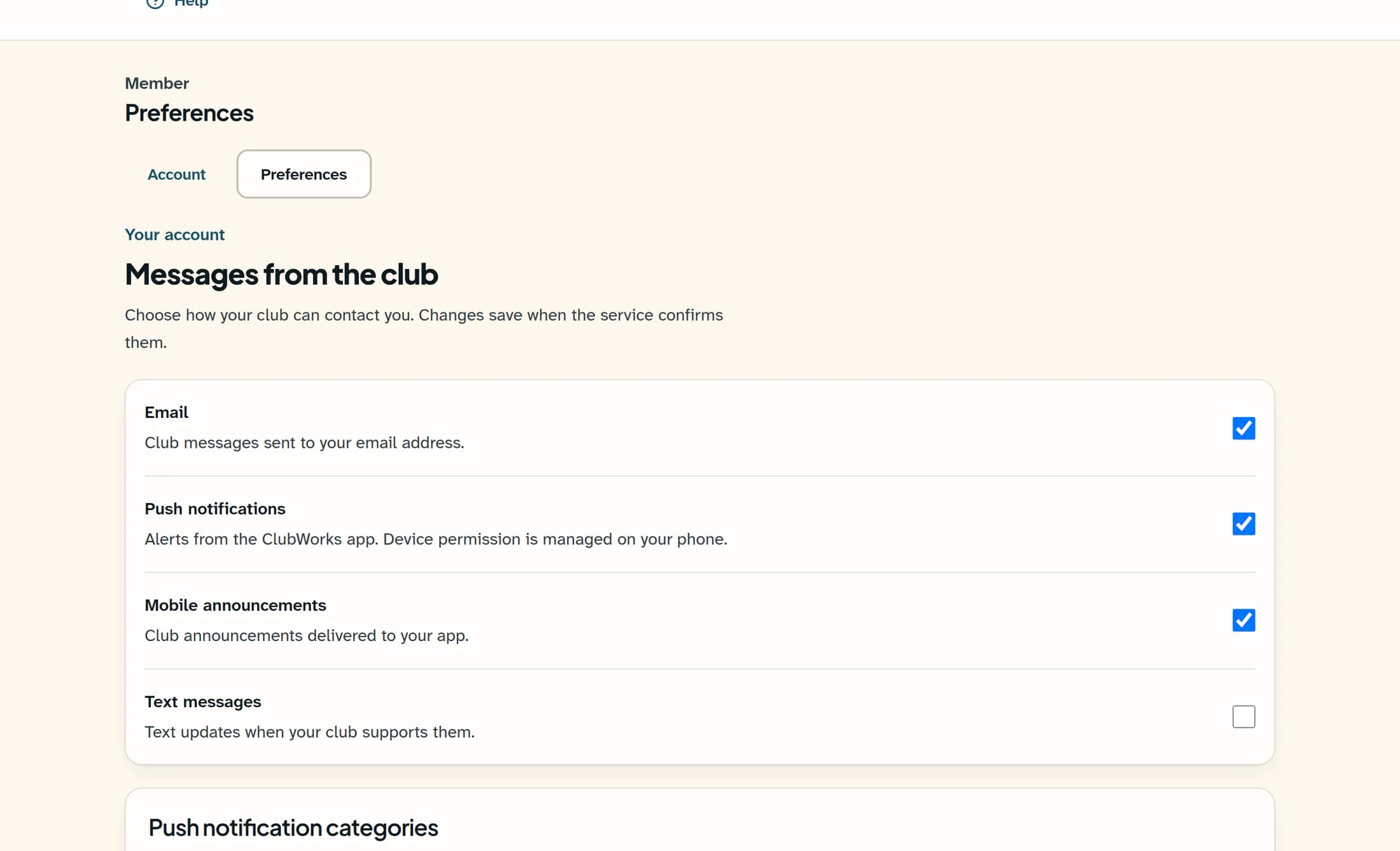
In Preferences, Messages from the club shows Email, Push notifications, Mobile announcements and Text messages. A checked box means that choice is on; the fictional example shows email, push and app announcements on, with texts off. These match the starting values used when no preferences have been saved, but your own saved choices may differ.
Email and text messages are separate permissions
Email controls club communication emails: that send path skips members whose email choice is off, and also skips unusable or placeholder addresses. Text messages is opt-in and starts off; the club text sender requires both that choice and a valid mobile number on file. An enabled choice does not set up the club’s sending service or include you in every audience.
Unsubscribing affects a channel
A club-email unsubscribe link changes the email choice for that member and club; it does not turn off texts or push. Text-message opt-out and opt-in replies are handled separately through the texting service, so a saved website choice and the service’s ability to send are distinct checks. Neither email subscription nor text consent proves that a phone is registered for app alerts.
Push needs more than the main switch
Push notifications is the main club preference checked for an identified member’s registered devices. A phone also needs notification permission, successful registration with the correct club and member app, and an active usable registration; the website checkbox cannot grant phone permission. The app can report that a device is registered while iOS alerts or sounds are limited, so registration alone does not guarantee a visible or audible alert.
Categories narrow the push alerts you want
Push notification categories applies to the actual type of a member notification, not words in its title. A checked category permits that type when the main push choice and device requirements also allow it; an unchecked category suppresses that type for identified members’ devices. Category choices can remain saved while the main push choice is off, and these controls do not remove updates from the app.
The available push categories
- Club announcements — manually composed club push notifications.
- News — notifications for news articles.
- Club messages — notifications from the club communications sender.
- Events; Menu specials; Membership reminders.
- Volunteer opportunities; Volunteer reminders.
- Emergency alerts; Other club updates. Emergency alerts is a selectable category, so its name is not a guarantee that it overrides an opt-out.
App announcements and phone alerts are different
Mobile announcements refers to club announcements delivered to the app, whereas push is the alert sent to a registered device. In the communications sender, an announcement sent without push respects the mobile-announcement choice when it creates delivery records; when push and an app announcement are sent together, the app announcement reuses the push notification record without a separate mobile-announcement preference check. This choice therefore is not a blanket hide-all rule for app content, and turning off alerts does not unpublish club news.
Your preferences do not decide the audience
Each communication still has a selected audience, such as all members, active memberships, officers, a membership category or selected people, and the communications sender starts from active user records. Push also depends on eligible registered devices and the correct app family; staff notifications have their own audience and are not redirected by member category choices. Broad club push can include devices that are not linked to a signed-in member, so a member-record preference should not be treated as a universal device-level opt-out.
Account and service emails have their own purpose
The club-email choice is not an all-email kill switch: sign-in codes and password-reset emails use the authentication service, and system-email sending does not apply the club communication email preference. Whether another service message is sent depends on its own feature and delivery rules. There is no general promise that every transactional message will arrive or that every alert bypasses your choices.
What a saved choice tells you
The preference display is updated after the service returns the saved values, with Communication preferences saved. confirming that save. A loading message or an error is not confirmation; category loading and saving also have their own error states. Demo preferences cannot be changed, and none of these states verifies that a message has been delivered.
If the result seems wrong
- Email or texts are missing: a correct preference still needs the right audience and usable contact details. The club may see a skip because of an opt-out or missing address, or a failure from its sending service.
- Push is missing: the main choice, category, current club, phone permission and device registration are separate checks. A registered device may still have limited alerts or sounds, an expired registration or a delivery error.
- An update is still in the app after alerts are off: published content and app records are separate from a phone alert. The combined push-and-announcement behavior above also limits what the announcement choice can suppress.
- A preference appears unchanged: an error, unfinished load or demo mode can explain it. The wording shown on your screen is useful to club support; repeated notification sends do not repair a preference save.
- The club says a message was sent: channel summaries can include skips, partial failures or zero eligible push devices. Provider acceptance does not prove that a notification appeared on your phone or that you read it.
What to expect
You can use each choice to understand the contact it controls without treating it as a delivery receipt. For a missing or unexpected message, the useful question is which layer applied: club preference, category, audience, contact details, device permission or delivery result.
About the illustration
The illustration is reconstructed from ClubWorks source with a fictional club and example choices. It is not a live account screenshot or proof of a successful save, send or device setup; live workflows and native-app delivery were not verified.
