
On this page
- Start with the latest approved facts
- A compact factual checklist
- What Review required means
- Worked example: approved source versus faulty draft
- Approved facts for this fictional example
- Reconcile each difference
- Corrected copy
- Details to review is a starting point
- Account for changed settings and newer edits
- Make a final pass across all fields
- Copying or accepting text is not publication
- Ready for the next workflow
Start with the latest approved facts
Use the event plan, approved price list or other responsible club record, and identify who can resolve questions. Keep its approval date beside your review notes; an older flyer or previous AI response may already be out of date. If two sources disagree, get the responsible club contact to settle the difference before the copy is used.
A compact factual checklist
What Review required means
In the Communications assistant, Review required is a standing reminder; it is not a warning produced by checking the draft’s facts. Generated draft contains proposed text, and the panel says that AI text is never published automatically. The illustration shows deliberately faulty fictional copy so you can practice comparing it with the approved facts below.
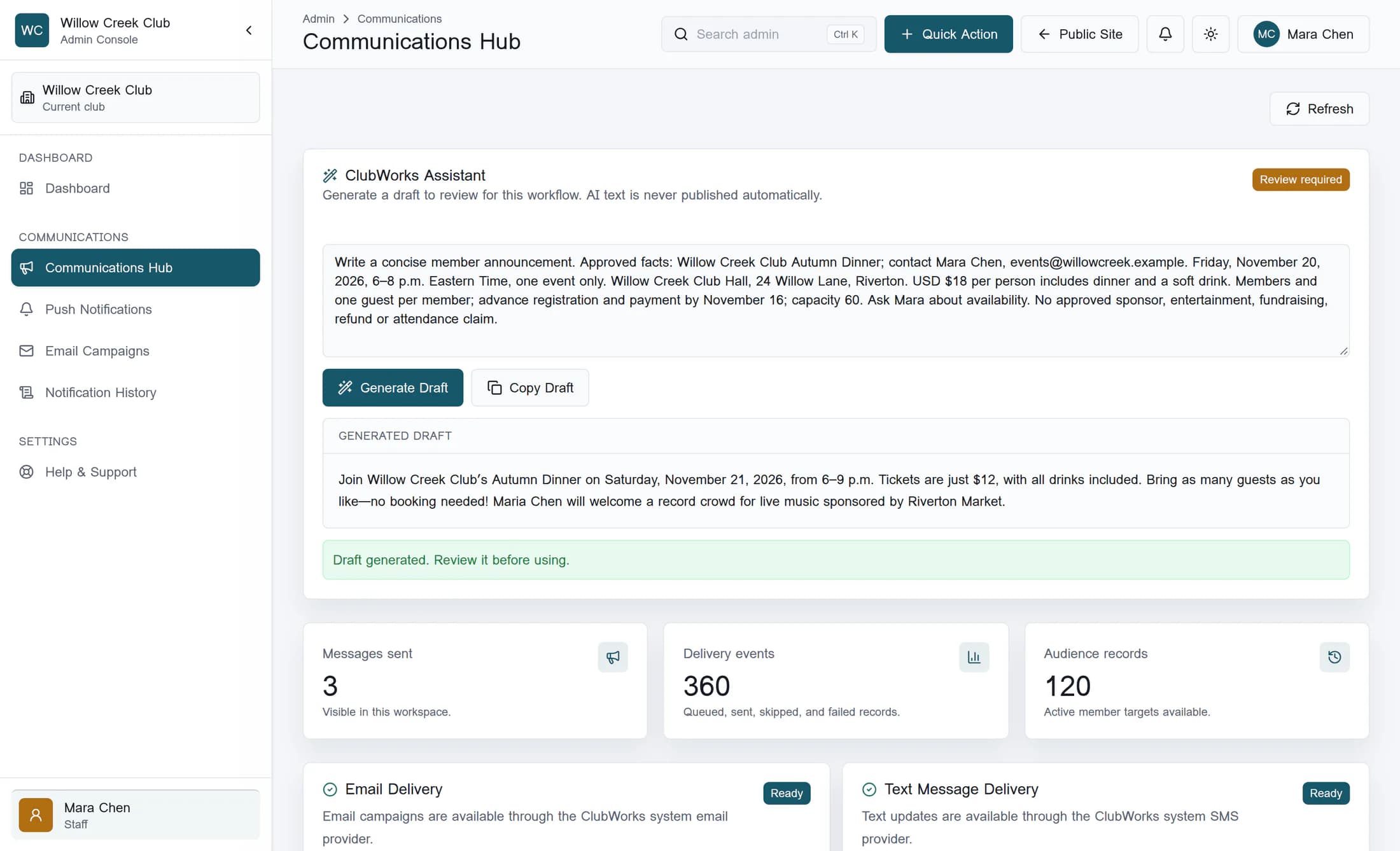
Illustration: a source-based reconstruction of the classic Communications screen. The club, people, prompt, records and draft are fictional; this is not a live model response. The live workflow has not been verified, and your club’s layout and available tools may differ.
Worked example: approved source versus faulty draft
Imagine that the fictional Willow Creek Club’s event organizer, Mara Chen, approved the following fact sheet on November 2, 2026. Use it as the authority for this exercise, rather than trusting the fluent draft.
Approved facts for this fictional example
- Event: Willow Creek Club Autumn Dinner. Organizer and contact: Mara Chen, events@willowcreek.example.
- One event only: Friday, November 20, 2026, from 6–8 p.m. Eastern Time.
- Location: Willow Creek Club Hall, 24 Willow Lane, Riverton.
- Price: USD $18 per person, including dinner and a soft drink. No other inclusion is approved.
- Eligibility and booking: members and one guest per member; advance registration and payment required by November 16, 2026. Capacity is 60 people; remaining availability has not been confirmed.
- No sponsor, entertainment, fundraising, refund or attendance claim is approved. Questions and registration go to Mara at the email above.
Faulty draft for review:
Reconcile each difference
- Name: “Maria Chen” conflicts with the approved “Mara Chen.” Correct it everywhere, including contact details and any picture text.
- Date and time: Saturday, November 21 and 6–9 p.m. conflict with Friday, November 20, 2026 and 6–8 p.m. Eastern Time. Restore the full approved date, end time and time zone; do not turn this into a weekly event.
- Price and inclusions: $12 and “all drinks included” conflict with USD $18 per person including dinner and a soft drink. Use the approved amount, currency, unit and inclusions.
- Guests and booking: unlimited guests and “no booking needed” conflict with one guest per member and advance registration and payment by November 16. State the approved conditions clearly.
- Claims: a record crowd, live music and Riverton Market sponsorship have no approved support. Remove them rather than soften them to “expected” or “possible.” Capacity 60 does not establish current availability.
- Missing details: the draft omits the hall address and registration contact. Add those verified details so the reader knows where to go and whom to contact.
Corrected copy
Corrected copy for this fictional example:
Details to review is a starting point
In the News and Events composer, Review suggestions can include Details to review when the model reports missing or conflicting facts. The list is advisory and may miss errors; its absence does not mean the draft is accurate or complete. Checks for valid response structure and text length do not verify dates, prices, policies or claims.
Account for changed settings and newer edits
The News and Events composer is instructed to preserve supplied event and audience settings when the brief contradicts them, but those settings may themselves be stale. Its apply guard refuses a proposal when the included event or audience details have changed since generation; selected fields with newer edits are preserved rather than overwritten. A proposal can therefore leave a mixture of accepted suggestions and newer text, so the final visible editor still needs a complete check against today’s approved facts.
Make a final pass across all fields
Copying or accepting text is not publication
Copy Draft copies the simple Communications draft to the clipboard; it does not save, publish or send it. In the News and Events composer, Apply selected fields changes editor values, while publication and delivery settings remain separate; applying optional push copy does not turn notifications on. Saving the record, choosing publication or scheduling, and confirming any notification behavior still belong to the relevant workflow and require their own checks.
Ready for the next workflow
Your review is complete when each claim has an approved source, unresolved details are settled or removed, and every visible field agrees with the current settings. That makes the copy ready for the appropriate saving or publication workflow; it does not establish that the content is already saved or live.
