
On this page
- Separate the request, the facts and the gaps
- Know what each assistant receives
- News and Events include more draft context
- A reusable brief and facts template
- Writing request
- Facts checked by the club
- Unresolved facts or conflicts
- Before: a request that leaves too much open
- After: the same request with checked facts
- If the price is still unknown
- A better prompt still needs a human review
- Keep the brief useful
Separate the request, the facts and the gaps
Instructions describe the writing you want: the format, audience, tone, length and reader action. Supplied facts describe what is true, such as an event date or approved price; missing facts are details you still need to confirm. Keep these parts separate so “make it welcoming” cannot be mistaken for permission to invent a discount or guest policy.
Know what each assistant receives
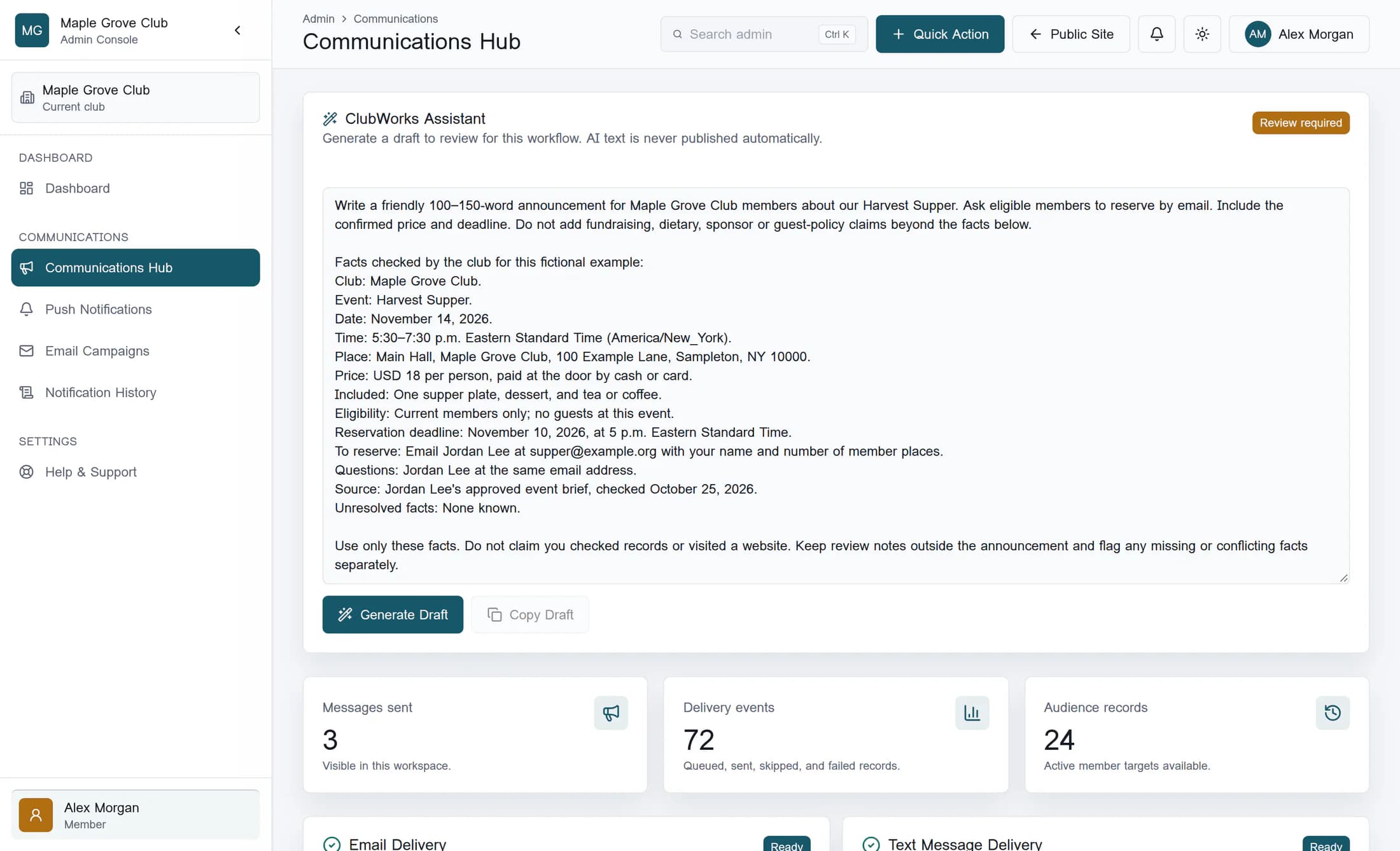
The simple ClubWorks Assistant in Communications receives your typed prompt, a fixed description of the communications workflow and the club name checked by the server. It does not receive every club record or automatically read the contents of a link you mention, so include the relevant facts as text. The illustration shows the classic Communications Hub with a fictional prompt before generation. The reconstructed prompt box is enlarged to represent a manual resize and make the example readable; this is not its default size.
News and Events include more draft context
The Create with AI composer in News and Events also receives the current draft fields, selected event and audience settings, and club context such as the name and time zone. Selected settings can include dates, location, price, registration, contacts and recurrence; this is still a bounded set of supplied information, not a search of all club records. If your brief contradicts an event setting, the composer is instructed to retain that setting and flag the conflict, so reconcile the actual facts and settings before using the draft.
A reusable brief and facts template
Use this template to gather your brief before working with the assistant; omit fields that do not apply. Replace the bracketed notes with checked details, and identify anything unresolved instead of guessing. A link can identify your source, but the relevant facts still need to be in the brief.
Writing request
- Output: [announcement, reminder, news article, or revision]
- Audience: [who will read this]
- Goal / reader action: [what readers should do]
- Tone and length: [for example, friendly and 100–150 words]
- Must include: [essential points]
- Leave out: [unsupported claims or irrelevant details]
Facts checked by the club
- Names and exact spelling:
- Event / subject:
- Full calendar date and year:
- Start and end time, including time zone:
- Location, room and full address:
- Price, currency, what it covers and payment details:
- Deadline, with date, time and time zone:
- Member / guest eligibility and relevant approved policies:
- Verified contact and link, if relevant:
- Other confirmed details:
- Source / person who confirmed these facts and when:
Unresolved facts or conflicts
- [State each gap or contradiction, or “None known.”]
- Use only the supplied facts. Do not invent missing details.
- Keep unknowns and review notes out of reader-facing copy.
- List missing or conflicting facts separately for my review.
Before: a request that leaves too much open
All names, addresses, prices and event details in this example are fictional. This short request gives a tone and a topic but leaves the assistant without the date, place, price, eligibility or reservation details.
Write a friendly announcement for our club dinner. Make it sound fun and tell people how to book.
After: the same request with checked facts
This complete example separates the writing request from a fact sheet and names the person who checked it. In your own brief, use real details confirmed by the responsible person; example.org and the other fictional details below are not booking information.
Write a friendly 100–150-word announcement for Maple Grove Club members about our Harvest Supper. Ask eligible members to reserve by email. Include the confirmed price and deadline. Do not add fundraising, dietary, sponsor or guest-policy claims beyond the facts below.
Facts checked by the club for this fictional example:
Club: Maple Grove Club.
Event: Harvest Supper.
Date: November 14, 2026.
Time: 5:30–7:30 p.m. Eastern Standard Time (America/New_York).
Place: Main Hall, Maple Grove Club, 100 Example Lane, Sampleton, NY 10000.
Price: USD 18 per person, paid at the door by cash or card.
Included: One supper plate, dessert, and tea or coffee.
Eligibility: Current members only; no guests at this event.
Reservation deadline: November 10, 2026, at 5 p.m. Eastern Standard Time.
To reserve: Email Jordan Lee at supper@example.org with your name and number of member places.
Questions: Jordan Lee at the same email address.
Source: Jordan Lee's approved event brief, checked October 25, 2026.
Unresolved facts: None known.
Use only these facts. Do not claim you checked records or visited a website. Keep review notes outside the announcement and flag any missing or conflicting facts separately.
If the price is still unknown
Replace the example's price, payment and “None known” lines with an explicit gap rather than treating an unknown price as free. The wording below asks for a separate review note; it does not guarantee the assistant will catch every omission. Confirm the price and payment arrangements with the organizer before using the announcement.
Price and payment arrangements: Unknown; awaiting Jordan Lee's confirmation.
Unresolved facts: Price, accepted payment methods and when payment is due.
Do not choose a price, call the event free or invent payment instructions.
Omit these details from reader-facing copy for now.
List them separately as facts I must confirm; do not put placeholders in the announcement.
A better prompt still needs a human review
Check the result against the approved source for names, dates, time zones, prices, eligibility, contacts and every factual claim, then resolve any gaps or contradictions. Details to review in the News and Events composer is advisory: no warning does not prove that the draft is complete or accurate. The simple panel says Review required because AI text is never published automatically; Copy Draft copies text only and does not insert it into an editor, send it or publish it.
Using the assistant depends on your club's AI setup and your permissions for the relevant content workflow. If it is unavailable, your club administrator can check those settings; this guide does not confirm that generation is available for your account.
Illustration note: this is a reconstruction from the product source with fictional club information, not a screenshot of a live account. No live generation, copying, sending or publishing workflow was tested for this guide; the fictional example is a prepared writing brief, not a model response.
Keep the brief useful
State what you want written, supply the facts you have checked, and name what is still unknown. Treat the result as a draft to verify before any separate insertion, sending or publication step.
