
On this page
- Access belongs to a club and a workspace
- A role is only one part of availability
- Some tools need more than a feature switch
- Viewing and changing are separate permissions
- One permission does not unlock every setting
- Disabled does not always mean denied
- A failed access check is different from a denied permission
- Menus can move without access changing
- A link does not override authorization
- Useful context for your club administrator or support
- Match the explanation to the symptom
Access belongs to a club and a workspace
Member pages, staff tools, club administration and platform administration serve different purposes. A role in one club does not automatically grant the same access in another, and a product link belongs to the club it connects.
A role is only one part of availability
Club feature requirements are checked before the administrator shortcut used by the navigation. For example, Dues needs both membership management and dues management; an administrator role alone does not make that entry appear.
Some tools need more than a feature switch
The TabWorks menu also depends on the club having POS enabled and a linked TabWorks organization. Aerie tools depend on the applicable club profile, while rental tools have their own feature and module-access requirements; administrators bypass some permission and module tests, but product and organization filters still apply.
Viewing and changing are separate permissions
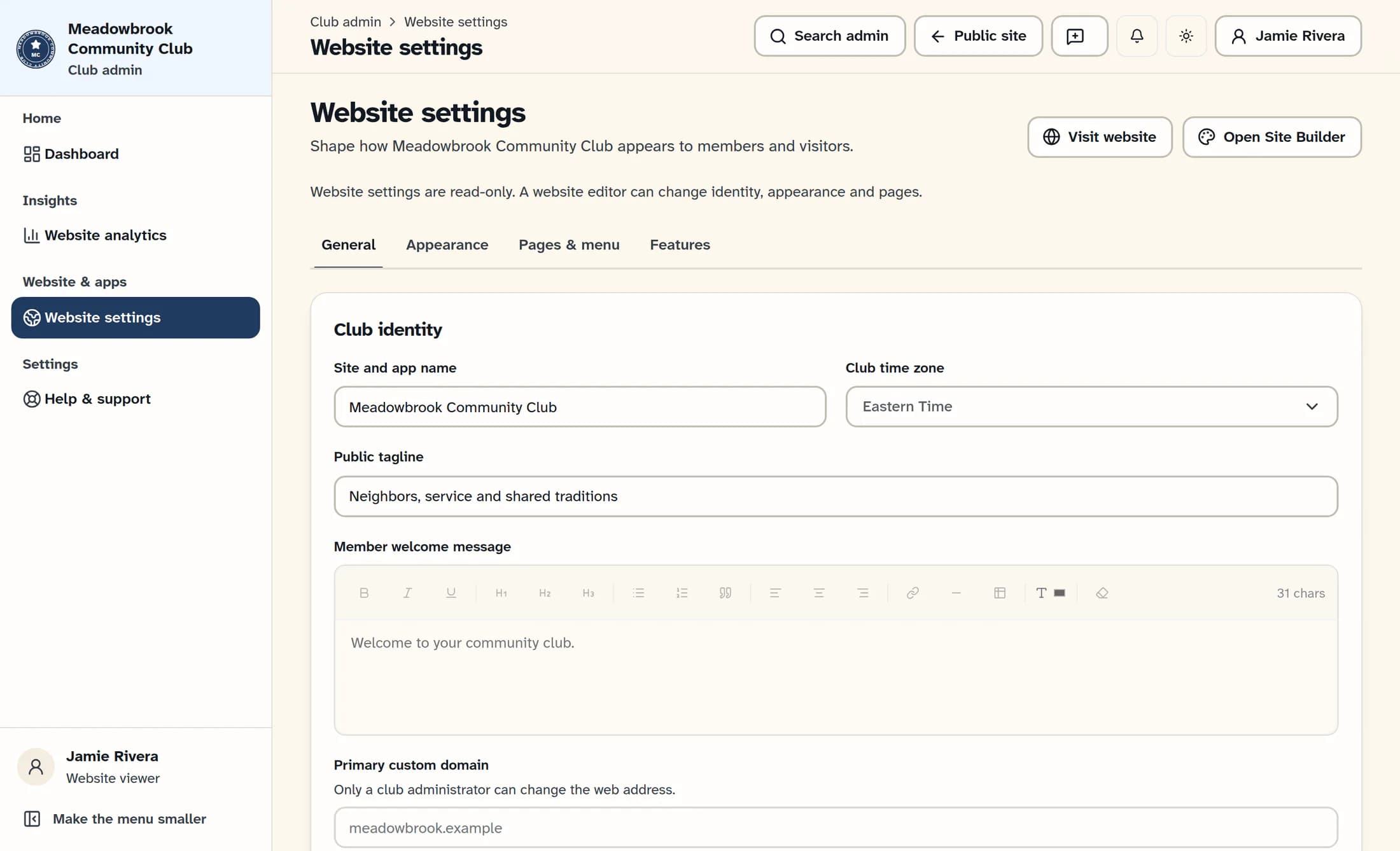
Website access can allow you to see settings without changing them. In the newer Website settings view pictured here, the read-only notice, disabled identity fields and absent save button come from the viewer's permissions.
One permission does not unlock every setting
Website editing, settings management and domain changes are separate capabilities. A website editor may change identity, appearance and pages, while feature changes need settings management and web-address changes need administrator access.
Disabled does not always mean denied
A button may be unavailable while information loads or a save is running, when nothing has changed, or while a prerequisite is missing. Website settings can also lock other panels while a draft is unfinished or a save result is uncertain, and time-clock settings depend on employee management.
A failed access check is different from a denied permission
A session or permission-check failure means the page could not establish access; it does not by itself prove that your role lacks permission. Refresh access rechecks the current session and permissions, but it cannot create a grant, and a save with an unconfirmed result is not proof that no change was stored.
Useful context for your club administrator or support
- The club name and the workspace where the problem occurs.
- The page and specific missing or disabled action, plus the exact message shown.
- The task you expected to perform and your expected role in that club.
- Whether the page is loading, saving, showing an unfinished draft, or using the classic or newer layout.
Match the explanation to the symptom
The page's message and your club context help distinguish a feature requirement, a permission limit and a temporary page state. Broader staff access should not be granted by guesswork.
This illustrated draft uses a fictional club and a source-reconstructed example of the newer website settings view. It has not been verified against a live club account; your enabled tools and layout may differ.
